
The AI Workflow is not a single button that guesses at a note. It is a structured, provider-guided process that moves from clinical context to finished chart data - with the provider in control at every step.
The moment you open the AI Workflow, Alma has already done the preparation. The Clinical Summary tab presents a pre-generated patient briefing — patient snapshot, clinical alerts, drug allergies, abnormal labs, care and safety notes, active conditions, medication list, and what has changed since the last visit.
You can start recording at any point. The summary is there so you walk in informed, not catching up.
What Alma surfaces before you start
Alma looks back across at least the last 10 encounters and draws from multiple sources — lab results, prior notes, medications, problem list, and patient memos — to build the summary before you walk in.
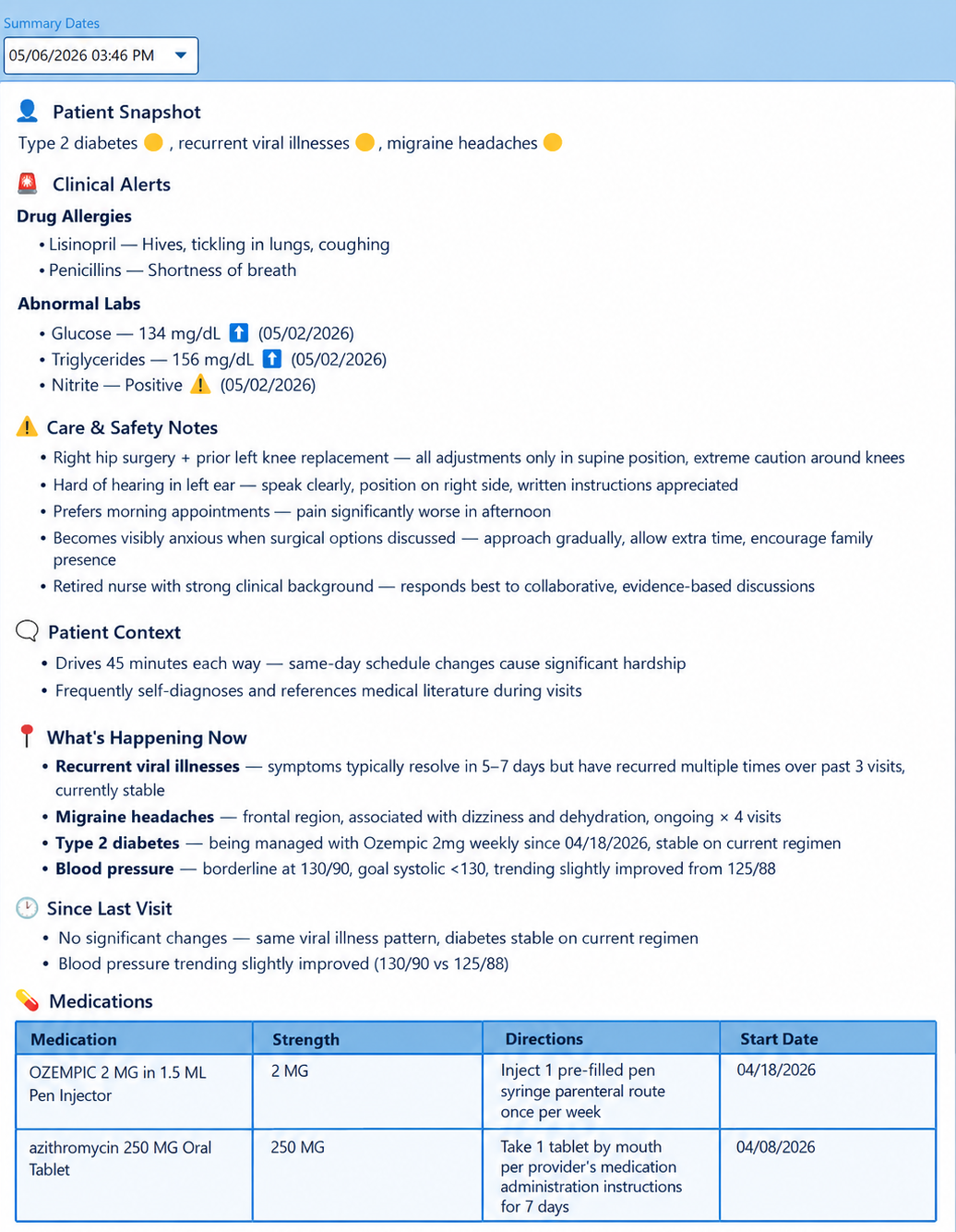
Patient snapshot, clinical alerts, and active conditions - ready before the first word is spoken.
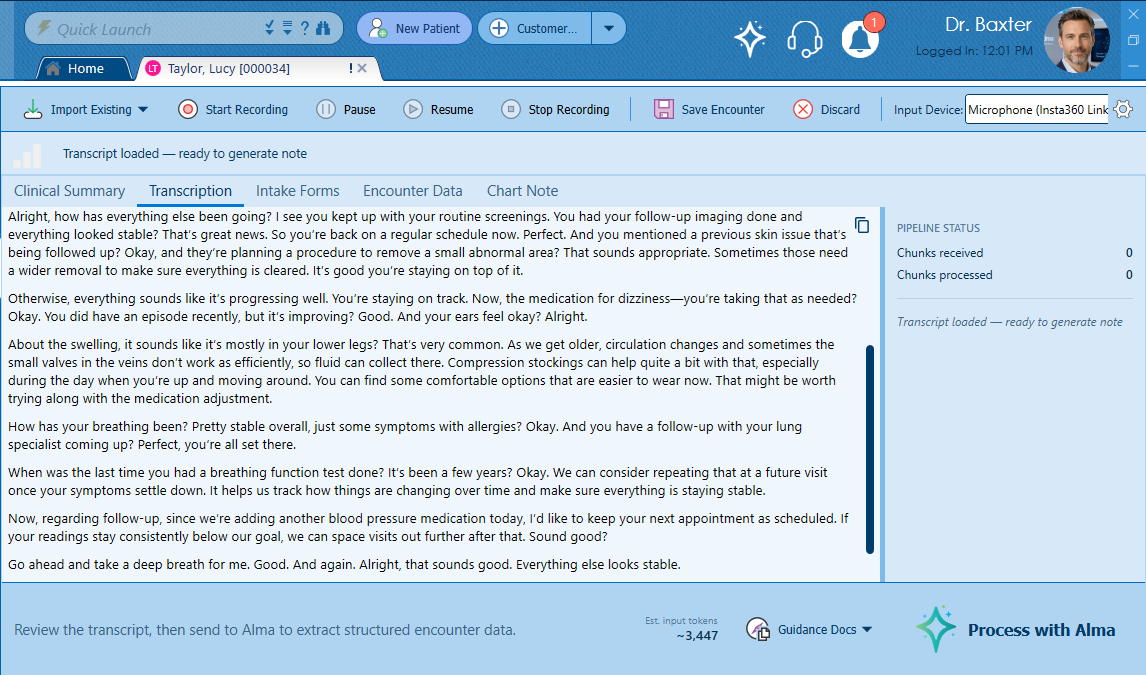
The transcript builds in near real-time. Silence detection keeps processing clean and efficient.
Hit record and see patients normally. Alma’s speech-to-text engine — running on MicroFour’s own server hardware — transcribes the encounter in near real-time as the conversation happens. The transcript builds in front of you, word by word.
Alma processes audio in roughly 30-second chunks when there’s speech. When there’s silence, she waits. No wasted processing, no network noise from empty audio, no garbage output from a quiet room.
Before processing, the provider selects from a library of clinic-configured Guidance Documents — specialty preferences, documentation style, coding standards. These are injected directly into each AI run, shaping how Alma interprets and structures the encounter.
If the patient completed digital intake forms before the visit, they appear here as reviewable PDFs. The provider chooses which forms to include — each one is processed by Alma in a separate AI pass and merged additively into the encounter data.
Every item sourced from an intake form is tagged visually in the Encounter Data so the provider always knows what came from the patient’s own responses. A failure on one form never blocks the others — each runs independently.
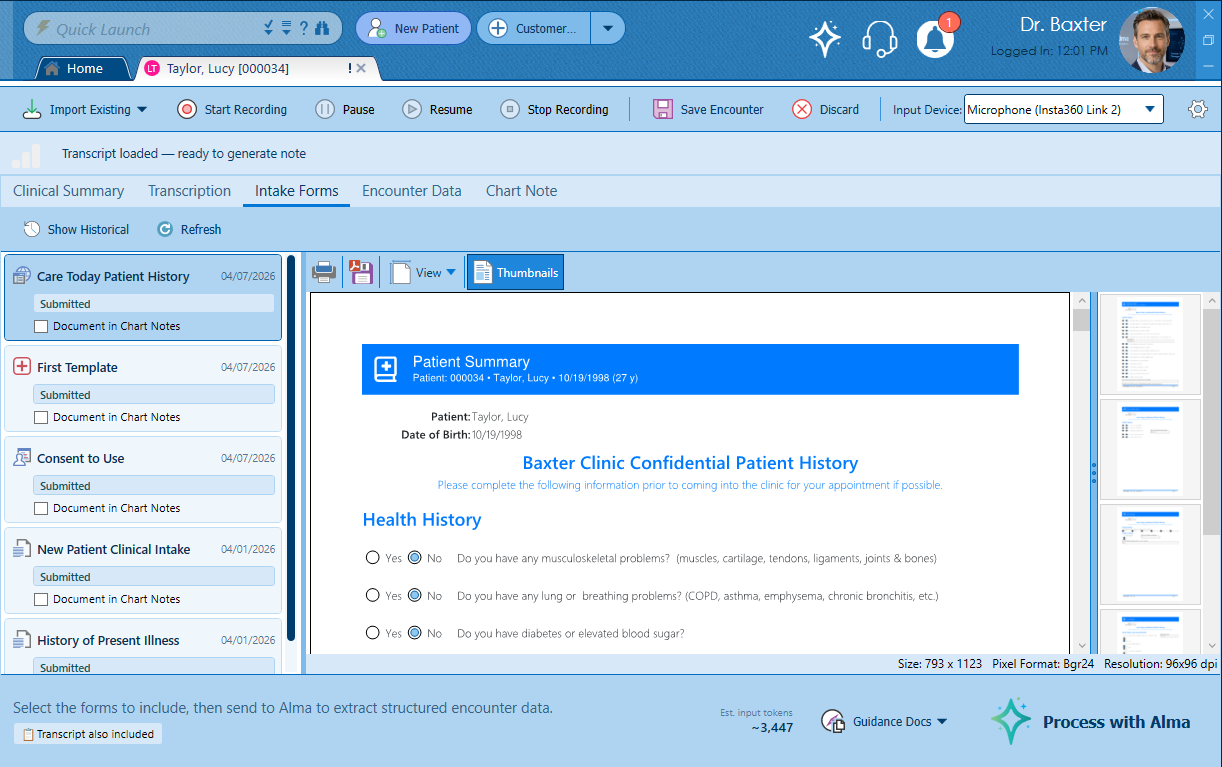
Patient-submitted forms reviewed and selected. Each is processed independently and merged into the encounter.
This is what separates Alma from every other AI documentation tool on the market. The output is not a block of text. It is structured clinical data — properly categorized, properly typed, and properly coded.
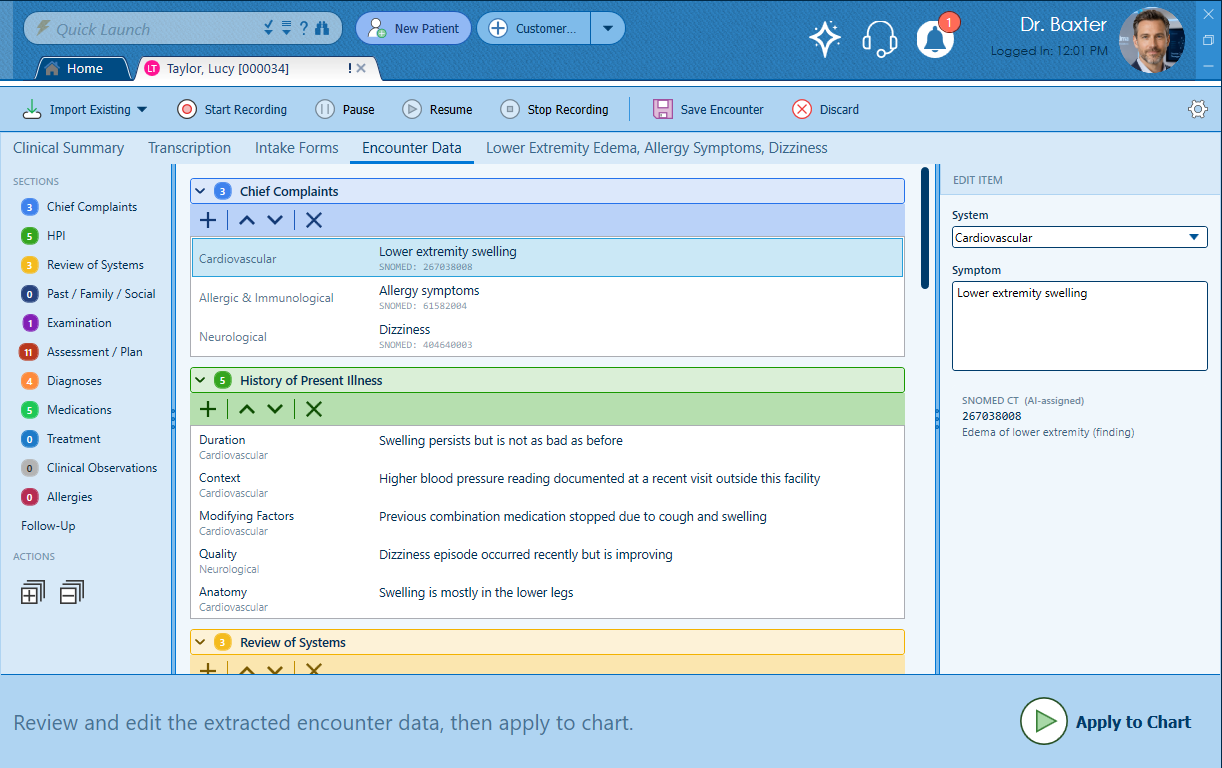
Chief Complaints, HPI, Review of Systems, Past/Family/Social History, Examination, Assessment/Plan — each as discrete, editable clinical data items.
Chief Complaints, HPI, Review of Systems, Past/Family/Social History, Examination, Assessment/Plan, Diagnoses, Medications, Allergies, Treatment, Clinical Observations, and more. Each section is a structured collection of discrete clinical items — not sentences in a paragraph.
Key clinical sections — including Chief Complaints, Review of Systems, and Assessment/Plan — are tagged with SNOMED CT codes, the internationally recognized standard for clinical terminology. Individual items can also be dictated, processed by Alma, and coded on the spot. The result is structured, standardized data that speaks the same language as every other system it will ever touch.
Every item is editable. Items can be added, reordered, or removed. The Encounter Data tab is a live working surface — not a locked output. When everything looks right, one click on Apply to Chart builds the complete narrative document.
A re-examination is not a new encounter — it is a comparison. Alma treats it that way.
When a provider opens AI Re-Exam on an existing encounter, Alma pulls forward the prior structured data and presents the current status of every clinical item alongside it. The provider documents where the patient is now — each item tagged with the appropriate status, whether that’s Improving, a New finding, or any other clinical status that reflects the patient’s current condition.
Alma synthesizes the comparison into a complete re-exam record — not just status labels, but clinical language that reflects the delta between the prior encounter and today.
Alma rebuilds the structured EncounterDocument from existing chart data on the fly. It doesn’t matter whether the encounter was created through the AI Workflow, built using Blueprints, or entered through PracticeStudio’s existing charting tools. Every encounter in PracticeStudio is AI-ready from day one — no setup, no re-entry, no gap between legacy records and AI capability.
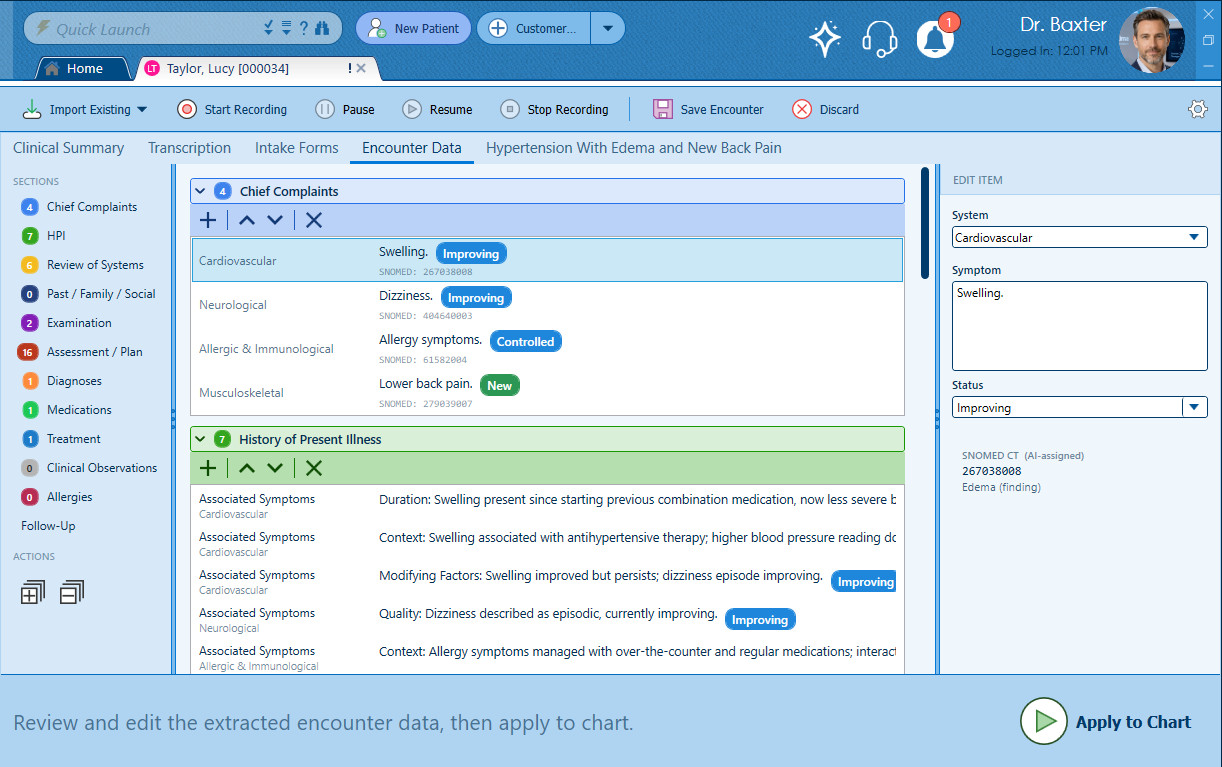
Improving and New findings clearly distinguished. The clinical delta at a glance.
Once the provider clicks Apply to Chart, the structured encounter data is rendered into a complete, properly formatted clinical document — every section written out in clinical narrative language, organized exactly as it would appear in a manually created note.
The Chart Note tab shows the finished document alongside a suggested billing code based on the clinical content — E/M level, decision complexity, and time. The provider reviews, makes any final adjustments, and signs.
The note that started as a natural conversation is now a structured, coded, signed clinical record — indistinguishable from one that took four times as long to create.
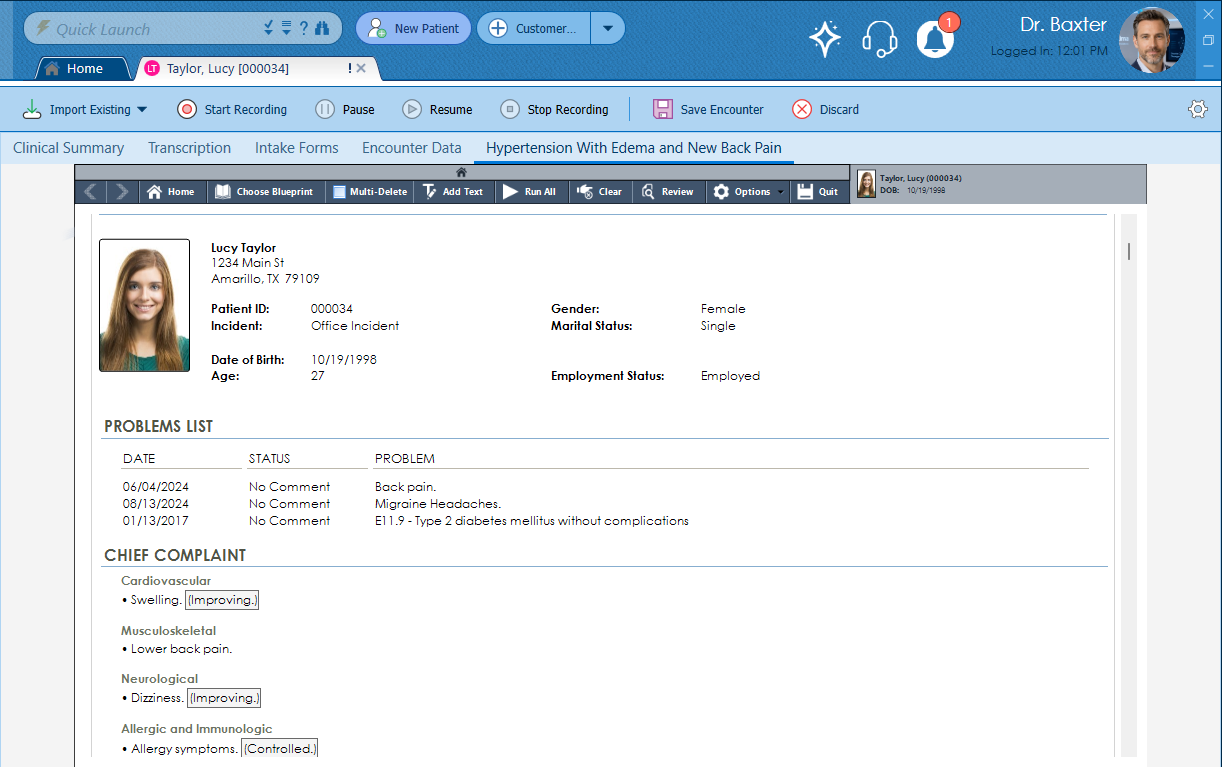
Structured data in. Complete clinical document out. Suggested billing code included.
A finalized encounter is not the end of the road. AI Edit opens any existing encounter back into the full AI Workflow environment — the provider can revise, expand, or restructure the clinical data, then apply the updated record back to the chart.
Whether it’s a missing finding, an updated assessment, or a documentation correction — AI Edit means the structured record stays accurate without starting over.
Three distinct AI actions. All accessible directly from the encounter. All producing the same structured clinical output.
The speech-to-text engine, the AI processing, the SNOMED code assignment — all of it runs on MicroFour-owned server hardware in Texas. No audio leaves our environment. No transcript goes to a third-party AI provider. No patient data touches OpenAI or Azure at any point in the workflow.